


Guides
TOTAL FOOD CONTROL
Creating warehouses is one of the most important actions when you start using the Total Food Control APP. On this occasion, we have prepared a small step-by-step guide for you to learn how to create these warehouses in a simple way. Don’t wait any longer and follow this training capsule to start using Total Food Control correctly.
Steps to follow to create a Warehouse
In the latest software update we have added a short tutorial on the first steps to follow when using Total Food Control for the first time. In the creation of the first warehouse, the steps include:
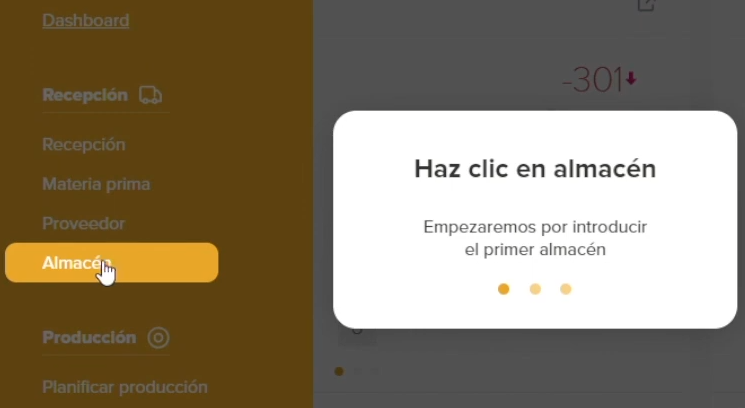
1. In the “Receiving” section of the main menu, click on the “Warehouse” section.
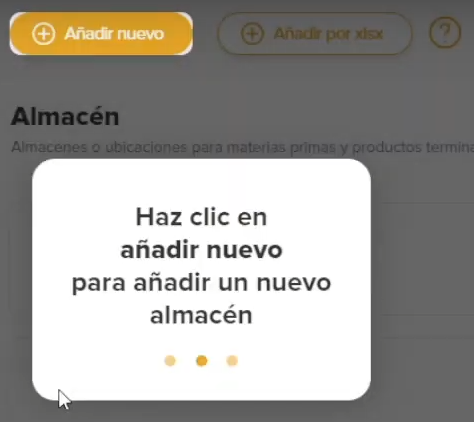
2. Then click on the “Add new” button on the top left.
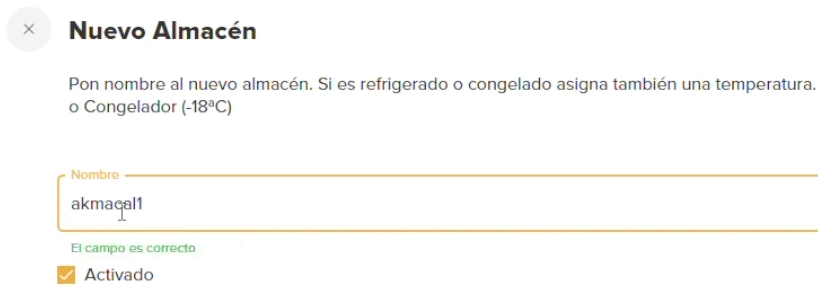
3. Fill in the name of the warehouse and click on “Register”.
4. At this point you have already created your warehouse, now you only need to add the products. To do this, you have to click on the warehouse to select it and click on “Add products”. You can do it individually or in bulk.
Request your free trial of Total Food Control
Digitization and adoption of Total Food Control represent a paradigm shift in the food industry. In a constantly evolving world where quality, safety and efficiency are paramount, these tools have become the engine that drives operational excellence.
We invite you to take the first step towards a future of excellence in the food industry. Discover how Total Food Control can transform your operations and contribute to the safety and quality of the food you produce.
Request a free 10-day trial today and witness the revolution that is reshaping the food industry!