How to create a Warehouse?

Guides
TOTAL FOOD CONTROL

How to create a Warehouse?

Creating warehouses is one of the most important actions when you start using the Total Food Control APP. On this occasion, we have prepared a small step-by-step guide for you to learn how to create these warehouses in a simple way. Don’t wait any longer and follow this training capsule to start using Total Food Control correctly.

Steps to follow to create a Warehouse

In the latest software update we have added a short tutorial on the first steps to follow when using Total Food Control for the first time. In the creation of the first warehouse, the steps include:

1. In the “Receiving” section of the main menu, click on the “Warehouse” section.
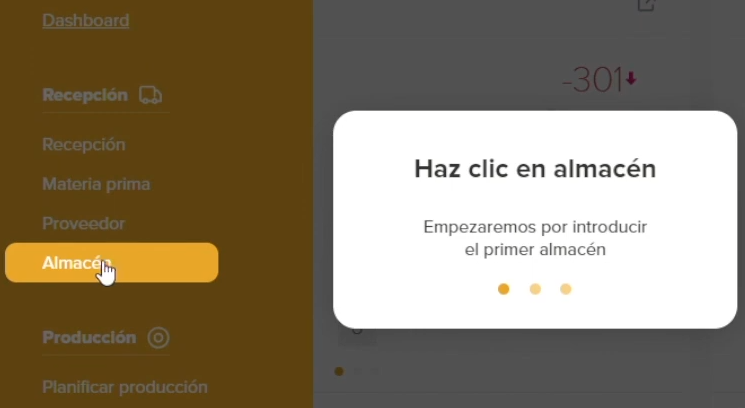
2. Then click on the “Add new” button on the top left.
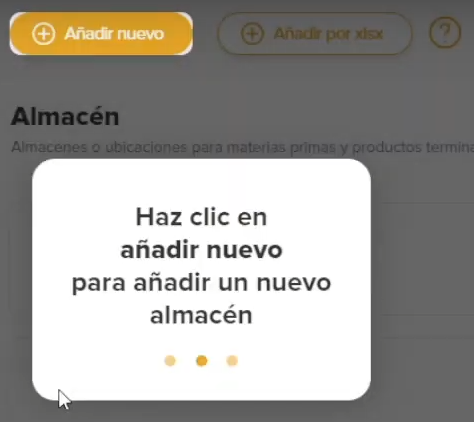
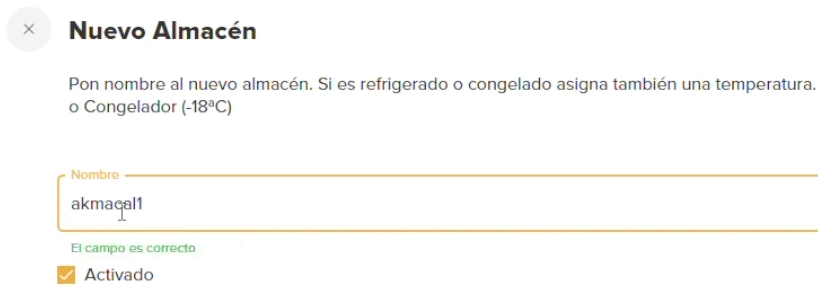
3. Fill in the name of the warehouse and click on “Register”.
4. At this point you have already created your warehouse, now you only need to add the products. To do this, you have to click on the warehouse to select it and click on “Add products”. You can do it individually or in bulk.


Request your free trial of Total Food Control

Digitization and adoption of Total Food Control represent a paradigm shift in the food industry. In a constantly evolving world where quality, safety and efficiency are paramount, these tools have become the engine that drives operational excellence.

We invite you to take the first step towards a future of excellence in the food industry. Discover how Total Food Control can transform your operations and contribute to the safety and quality of the food you produce.

Request a free 10-day trial today and witness the revolution that is reshaping the food industry!

How to change the UNITS OF MEASUREMENT of the RAW MATERIALS?

Guides
TOTAL FOOD CONTROL

How to change the UNITS OF MEASUREMENT of the RAW MATERIALS?

Do you want to change the unit of measurement on any of your raw materials? We have prepared this small guide for you so that you can easily modify the units. This time, you will learn the relationship between recipes, raw materials and units of measurement. Read on to learn step by step how to change the units of measurement.

Steps to follow to change the units of measurement

If you have already added all your raw materials to the software, but want to modify their units of measure, you can easily do so at any time. Here are the steps to follow to modify these units:

1. To begin with, we have to go to the “Raw Material” section in the Receiving section.

2. Next, select the raw material to be modified and click on the “Edit” button at the bottom left.

3. In the next tab we can edit any field of the raw material. Just click on “Unit of measurement” and select the new measurement.

4. Finally, we have to click on the “Update” button to save the changes.


Want a FREE trial of Total Food Control?

Total Food Control is a food traceability and inventory control software that can facilitate the management of your company. With Total Food Control, you can accurately keep track of expiration dates, minimum stocks, traceability trees, etc.

In addition, you can request your free 10-day trialThis allows you to explore its features and benefits before making a final decision. Take advantage of this opportunity to improve your warehouse management and optimize the quality of your products in the food industry.

How to create a NEW RAW MATERIAL RECEIPT?

Guides
TOTAL FOOD CONTROL

How to create a NEW RAW MATERIAL RECEIPT?

In this short tutorial, we focus on explaining how to create a new receipt of a raw material in the software of Total Food Control. You can follow the video tutorial step by step or follow the guide so as not to miss any point.

Steps to follow to create a new reception

Once the suppliers and the different raw materials have been added in the software, in order to manage traceability correctly, we will have to add the reception of raw materials when necessary. Although it is a very simple process, below you have all the steps to follow to create a new reception correctly:

1. The first step is to go to the “Receipts” section , click on the “Add new” button at the top left and select “New MP receipt”.

2. Next, we select the supplier.

3. We add the raw materials, filling in the data of “Expiry date”, “Quantity”, “Date of receipt” and “Delivery note number”. If no batch number is entered, the delivery note number will be assigned by default.

4. Finally, when all the information is entered, click on “NEXT”.

5. We assign warehouses and fill in the quality control and we have the raw material added.


Want a FREE trial of Total Food Control?

Total Food Control is a food traceability and inventory control software that can facilitate the management of your company. With Total Food Control, you can accurately keep track of expiration dates, minimum stocks, traceability trees, etc.

In addition, you can request your free 10-day trialThis allows you to explore its features and benefits before making a final decision. Take advantage of this opportunity to improve your warehouse management and optimize the quality of your products in the food industry.

How to manage RECIPES?

Guides
TOTAL FOOD CONTROL

How to manage RECIPES?

In this short tutorial we explain how to manage the recipes that we have already created in the Total Food Control software. Total Food Control software. You can follow the steps in a simple way by following the video tutorial that we have prepared or by using the guide with screenshots of each section.

Steps to follow to manage recipes in Total Food Control

Follow these simple steps to manage your recipes comfortably in the Total Food Control APP:

1. First we go to the “Recipes” section .

2. Here a table appears with everything we have created. If you want to create a new recipe, click on the “Add new” button.

3. Then we only have to fill in all the data requested by the program and click on “Create”.

4. Using the search engine we can find any of our recipes and edit it by clicking on the three dots on the right and clicking on “Edit”.

Want a FREE trial of Total Food Control?

Total Food Control is a food traceability and inventory control software that can facilitate the management of your company. With Total Food Control, you can accurately keep track of expiration dates, minimum stocks, traceability trees, etc.

In addition, you can request your free 10-day trialThis allows you to explore its features and benefits before making a final decision. Take advantage of this opportunity to improve your warehouse management and optimize the quality of your products in the food industry.

How to load TRACEABILITY TREES

Guides
TOTAL FOOD CONTROL

How to load TRACEABILITY TREES

Do you want to generate traceability trees automatically? In this tutorial we explain all the steps you need to follow to load traceability trees. traceability trees in the receiving, production or delivery modules. Just follow the written guide or watch the video tutorial.

Steps to follow to load traceability trees in Total Food Control

Reception

We go to the reception module.

2. In the reception table we can see a column on the left under the heading “TR”. If we click on the button of one of the foods, we can see its traceability tree.

3. If we click on any of the boxes, we can see all the information related to traceability.

Production

1. Go to the productions module.

2. Here we can see exactly the same “TR” column as in the reception module. If we click on the button of one of the productions, it will generate its traceability tree.

3. Similarly, if we click on any ingredient or production, we can see all the details related to its traceability.

Deliveries

1. Go to the deliveries module.

2. We also find the column “TR” in the deliveries table. By clicking on the traceability button, we can see the tree related to the production of that customer.

3. By clicking on each element, we can find all the information related to traceability.

Want a FREE trial of Total Food Control?

Total Food Control is a food traceability and inventory control software that can facilitate the management of your company. With Total Food Control, you can accurately keep track of expiration dates, minimum stocks, traceability trees, etc.

In addition, you can request your free 10-day trialThis allows you to explore its features and benefits before making a final decision. Take advantage of this opportunity to improve your warehouse management and optimize the quality of your products in the food industry.

Create a NEW PRODUCTION with an Existing Recipe

Guides
TOTAL FOOD CONTROL

Create a NEW PRODUCTION with an Existing Recipe

This guide focuses on explaining the process of creating a new production with a recipe already created in the Total Food Control APP. Total Food Control. Read on to learn all the steps or follow the video tutorial we have prepared to make it easy.

Steps to create a production with an existing recipe in Total Food Control

Below we show you step by step everything you need to do to learn how to create a new production with a recipe already created in the Total Food Control APP:

We go to the “Production” section.

2. Click on “New Production”.

3. Select the recipe you want to use.

4. Fill in all the data, assign the new batch and click “Next”.

5. Next we see all the ingredients that we are going to need depending on the recipe we have selected. We assign the amount of raw materials we need and click on “Next”.

6. Select the warehouse and click on “Next”.

7. Finally, the production control checklist appears , fill it in and click on “Create”.

Want a FREE trial of Total Food Control?

Total Food Control is a food traceability and inventory control software that can facilitate the management of your company. With Total Food Control, you can accurately keep track of expiration dates, minimum stocks, traceability trees, etc.

In addition, you can request your free 10-day trialThis allows you to explore its features and benefits before making a final decision. Take advantage of this opportunity to improve your warehouse management and optimize the quality of your products in the food industry.